

To save you some time deciding if you want to read this: this post covers a way to manage static and actionable information (notes and tasks) in one unified setup. It is based on out-of-the-box Obsidian, and doesn’t rely on any 3rd party plugins, AI, or whatnot.
It does rely though on quite advanced Bases queries, so implies you’re comfortable doing that. Nothing nasty — this article will guide you on the exact queries to put.
The benefits you can count on, should you decide to implement similar approach, are around these lines:
Unified context for tasks and notes — you don’t chase it, it just appears when you need it;
Single entry for notes and tasks allows you to capture fast, streamline automation, and resurface existing knowledge when you need it;
No MOC maintenance burden — related notes “magically” appear in your sidebar wherever you are, no matter which note or task you’re in; the setup doesn’t even mandate you to link stuff together to see it in one place.
Doesn’t depend on any file or logical organization — nothing is blocking you from dumping everything into one single flat folder, if you wish so.
All of that is possible thanks to Obsidian Bases dragged to a sidebar.
Some philosophy to understand the underlying problem
Dynamic and actionable information (tasks) and static knowledge (notes) for most of us are split into buckets that are far away from each other in terms of both the workflow and the tools. “Todo apps” vs “Notes apps” is often about severely disjointed effort to maintain - which contributes to chaos in our systems, fatigue, and the quality of our results.
Yet, we don’t do stuff in vacuum — most of our actions require context around them. There is knowledge that we refer to or rely on when we execute projects or activities. But somehow we became comfortable seeing these elements isolated from each other.
Another problem in modern tools is the requirement to explicitly connect things to actually start seeing the connections. We took this for granted that PKM apps just mirror our brains.
To my deepest belief this is one of the misconceptions that should go. Tools have to enhance and reinforce, instead of blindly mirroring or duplicating functionality. Tools must provide the surface for connections and help to see patterns, rather than just passively showcasing the patterns that already exist in our heads.
This also relates to a third problem.
Meaning is connected to symbols. Apps’ search is highly dependent on symbols. Most of the digital information is essentially symbols — text on our screens.
But humans are very much inconsistent in using these symbols. Our minds and languages are volatile, non-deterministic, impacted by mood, emotions, and other external factors. One day we call a project a “project”, the next day it’s a “job”, but sometimes it degrades to “a treadmill”. All refer to the same thing.
Apparently, there’s no scalable way to get predictable results and keep tools in sync with our vocabulary, because this vocabulary fluctuates. AI is supposed to be the solution here, naturally, but it still comes with quite a few drawbacks — on top of the fact that not everyone is ready to host all of their internal records at some LLM vendor.
The Solution
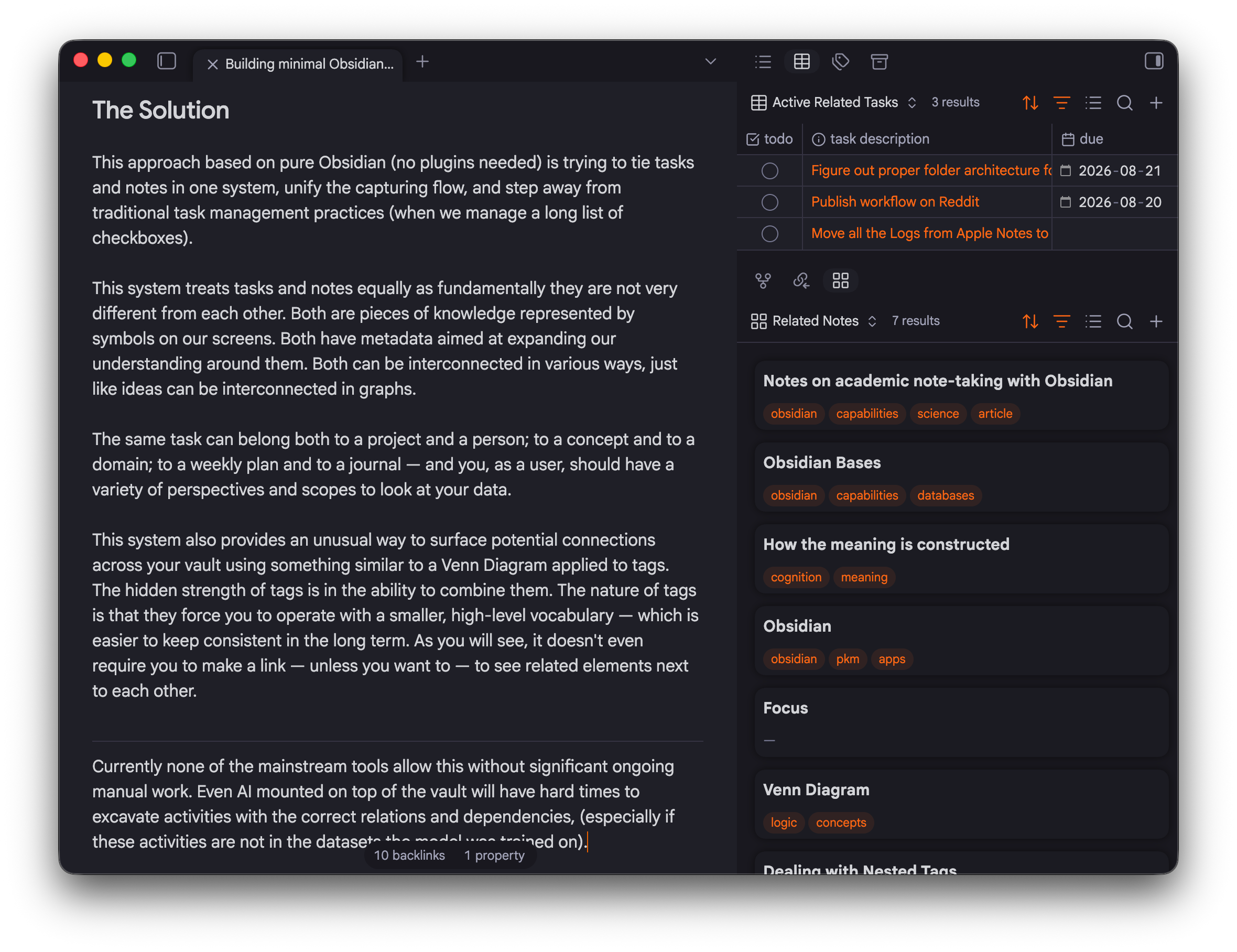
This approach is trying to tie tasks and notes in one system, unify the capturing flow, and step away from traditional task management practices (when we manage a long list of checkboxes).
This system treats tasks and notes equally. Both are pieces of knowledge represented by symbols on our screens. Both have metadata aimed at expanding our understanding around them. Both can be interconnected in various ways, just like ideas can be interconnected in graphs.
The same task can belong both to a project and a person; to a concept and to a domain; to a weekly plan and to a journal — and you, as user, should have a variety of perspectives and scopes to look at your data.
This system also provides an unusual way to surface potential connections across your vault using something similar to a Venn Diagram applied to tags.
The hidden strength of tags is in the ability to combine them. The nature of tags is that they force you to operate with a smaller, high-level vocabulary — which is easier to keep consistent in the long term.
As you will see, proper tag management sometimes can go as far as removing the requirement to make a link to see related elements next to each other.
To my knowledge, currently none of the mainstream tools allow this without significant ongoing manual work. Even AI mounted on top of the vault will have hard times to understand what’s important with the correct relations and dependencies.
The Setup
In this setup I did five things:
Dropped working with tasks as checklists — I have separate file for every task. This file must
contain a checkbox type of property (
todo:in my case) to be identified as a task;have due date property, when relevant;
link somewhere it belongs to — a project, a person, a contract draft, whatever
For the first 2 points, I use built-in templates and Apple Shortcuts for quick entry, so not really any extra activities outside of the initial config.
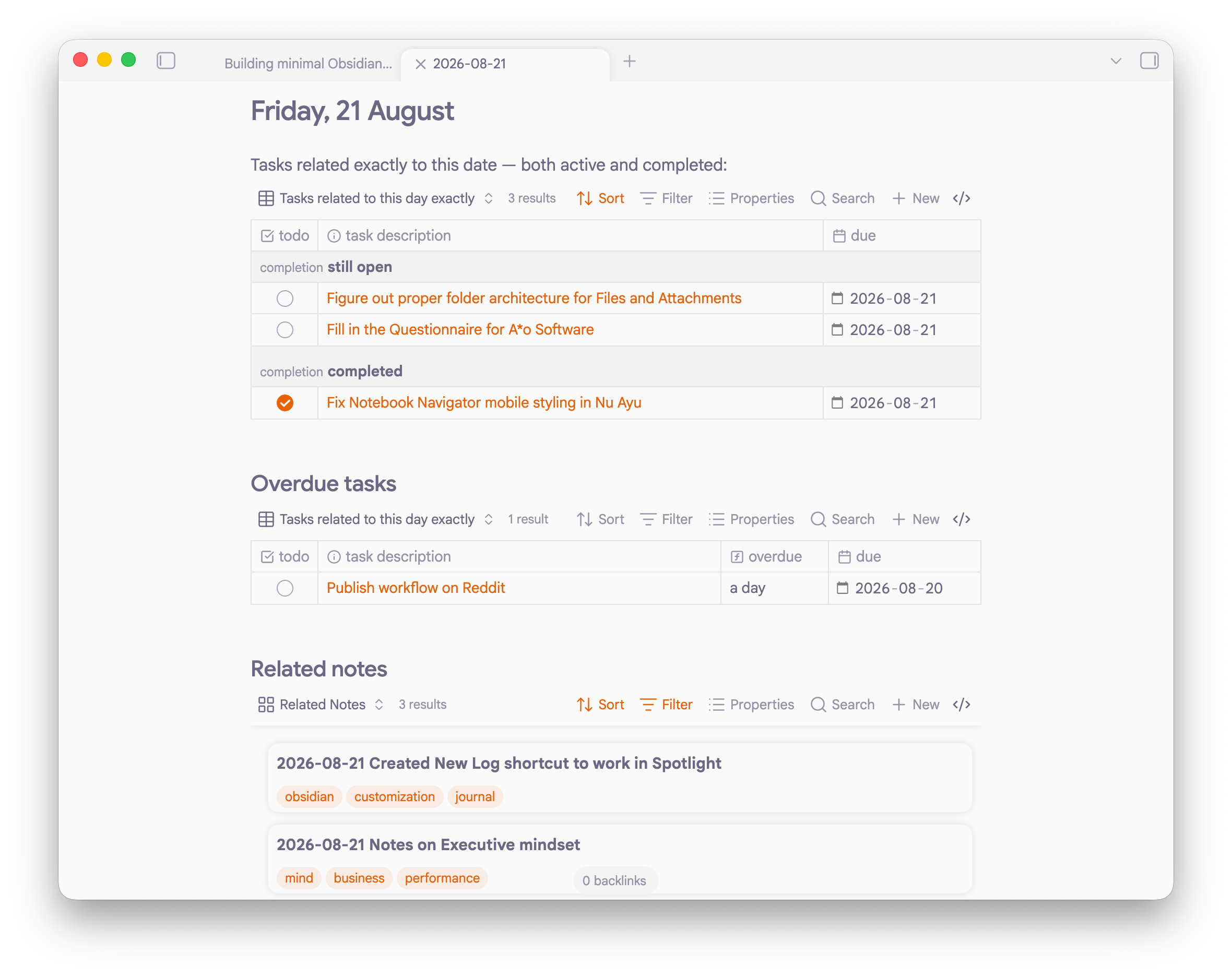
Created Obsidian Base for related tasks — collecting all the tasks linked to the file. The base is universal; it means the file can be anything, including a daily note. Queries are:
checking for the
todo:propertycollecting backlinks
checking for file name matches
checking
due:dates — which is essential for daily notes
Created another Obsidian base for related notes — collecting all the notes that are directly or indirectly (!) related to the one currently open. This is done by a combination of 4 queries in one base:
all linked notes from this note
all linked notes to this note
files that contain this note’s name in their name
files that have at least 2 tags overlapping with this note’s tags.
Configured a couple of Apple Shortcuts to create new notes / tasks directly from Spotlight or Control Center or even an Action Button on the phone.
Started to tag each note with almost everything that comes to mind — got tags back to what they were supposed to be long time ago: keywords.
Main components and how they work
Related tasks base
The Obsidian Base that will show tasks related to the note you have in front of you has these queries in it:
filters:
  and:
    - todo != NULL
    - or:
        - file.links.contains(this.file)
        - file.fullname.containsAny(this.file.name)
        - due <= date(this.file.name)
views:
  - type: table
    name: All related tasks
    order:
      - todo
      - file.name
      - due
    sort:
      - property: todo
        direction: ASC
  - type: table
    name: Active related tasks
    filters:
      and:
        - todo == false
    order:
      - todo
      - file.name
      - due
    sort:
      - property: todo
        direction: ASC
Did you know you can create a base directly inside the codeblock? I just learned when I was writing this: you don’t have to create standalone files for everything — just put it in a codeblock marked as “base”. It’s insane!
Drop this base to the sidebar or directly embed into a note, and you’ll get all the “related tasks” no matter what you are a look at — a project, a person, an area of interest, a hobby, a customer, or today’s daily note... The base is universal.
Now all you have to keep in mind is just this:
tasks you create must have
todo:checkbox property in the Frontmatterand they have to link somewhere to be seen
From now on you can complete the tasks from anywhere they show up — a daily note that collects everything with today’s due date, a project note that collects all the linked tasks, a person note that shows a task list this person is responsible for, and so on. Just click directly on the checkbox in the Base.
And of course you can always create All Tasks.base that will show all the tasks you have ever created, grouped by statuses or projects, or however you like. Old or unimportant tasks can easily be moved to archive which can be excluded from Obsidian’s file index. I also put tasks into a separate /Tasks folder.
Related notes base
This is a bit more complex. There are 4 rules to identify if a note is “related” — it can be anything from this list:
Notes linked from the note you’re looking at (i.e. outgoing links)
Notes linked back to the note you’re looking at (i.e. backlinks)
Notes containing the note you’re looking at in it’s name (e.g. “Google Workspace” will be shown as related to “Google” note)
Notes that have at least 2 tags overlap with the note you’re looking at
These four rules form an Obsidian Base that you put to the sidebar or transclude into a note:
filters:
  and:
    - or:
        - file.links.contains(this.file)
        - file.fullname.contains(this.file.name)
        - file.backlinks.contains(this.file)
        - file.tags.filter(this.file.tags.contains(value)).length >= 2
    - todo == null
    - file.ext == "md"
views:
  - type: table
    name: Table
Don’t forget to create a standalone .base file to drag it around
The fourth rule above deserves a bit more attention.
The two-tag rule: Venn Diagram for tags
Showing all the notes that have 1 tag in common is an overkill and leads to noise. If you narrow this to 2 tags to overlap, you basically step into the Venn Diagram territory, which significantly narrows the amount of options to be shown.
And those options will be very distinct by the nature of the mechanism. #family and #projects, #business and #finance — those are the simplest examples how you get results that are much more precise than if you would be looking at each of the individual parts alone.
But to get it right, each note must have around 2-3 keywords per note.
This mechanism is capable of surfacing the notes from the darkest corners of your vault.
Perform a thinking experiment on your collection — what would be the results of the search of any of the combinations above — let’s say #family + #travel; #business + #travel, #business + #ideas, #thinking + #frameworks, etc.
Now get deeper — what if you use tags as a reflection of your broader vocabulary? Are there any concepts that you operate with regularly, something that reflects your personal language, your individual vocabulary? So far it looks like those words are precious for this setup.
Let me give you a real-life example. 2 notes:
Note about Dealing with nested tags; tagged as
#pkm #tagging #hierarchy— it explains how the hierarchy of tags is built;Saved article about Scaling a Semantic Layer with Interoperable Ontologies; tagged as
#business #pkm #ontology #hierarachybecause this is about enterprise knowledge management and hierarchies.
Both notes will be shown next to each other, because #pkm and #hierarchy apply to both. I have never thought of linking them, and even forgot the article on ontologies was saved 6 months ago — and yet it’s there. Not necessarily a direct connection, but certainly something to explore further.
That’s the purpose of the tool — to help notice.
A tag might be a highly saturated symbol that matters to an individual. Combined, they form a very distinct concept field that, if shared by several elements, becomes a high signal opportunity for a connection.
Those combinations of tags are a high quality source of new links and connections — the ones that you have missed or have not yet seen.
For me, it is much easier to tag when I write a note, than a vague thinking “hmmm, what else is related here”. That thinking is valuable work, but sometimes it ends nowhere. And this is where note relations may come into play through tags I already forgot I put.
It’s like chunking done manually: when you split the meaning into pieces that are recognizable to you. Business ideas can be split into #business #ideas; the same way as #marketing #strategies or #note-taking #frameworks can.
The figure 2 in the “2 tag rule” is the easiest entry point into the sense-making territory. But as your vault grows, it can easily be replaced by 3 (i.e. three tags must overlap) to make matches even stronger — especially if you do not hesitate to label your notes with keywords.
The Part for Nerds
You can actually go beyond this — Obsidian allows you to perform mind-blowing experiments in Bases.
What if the note relevance is not binary (linked / not linked), but graded? Can I see how far or close notes are from each other — and still not have to install any plugins for that?
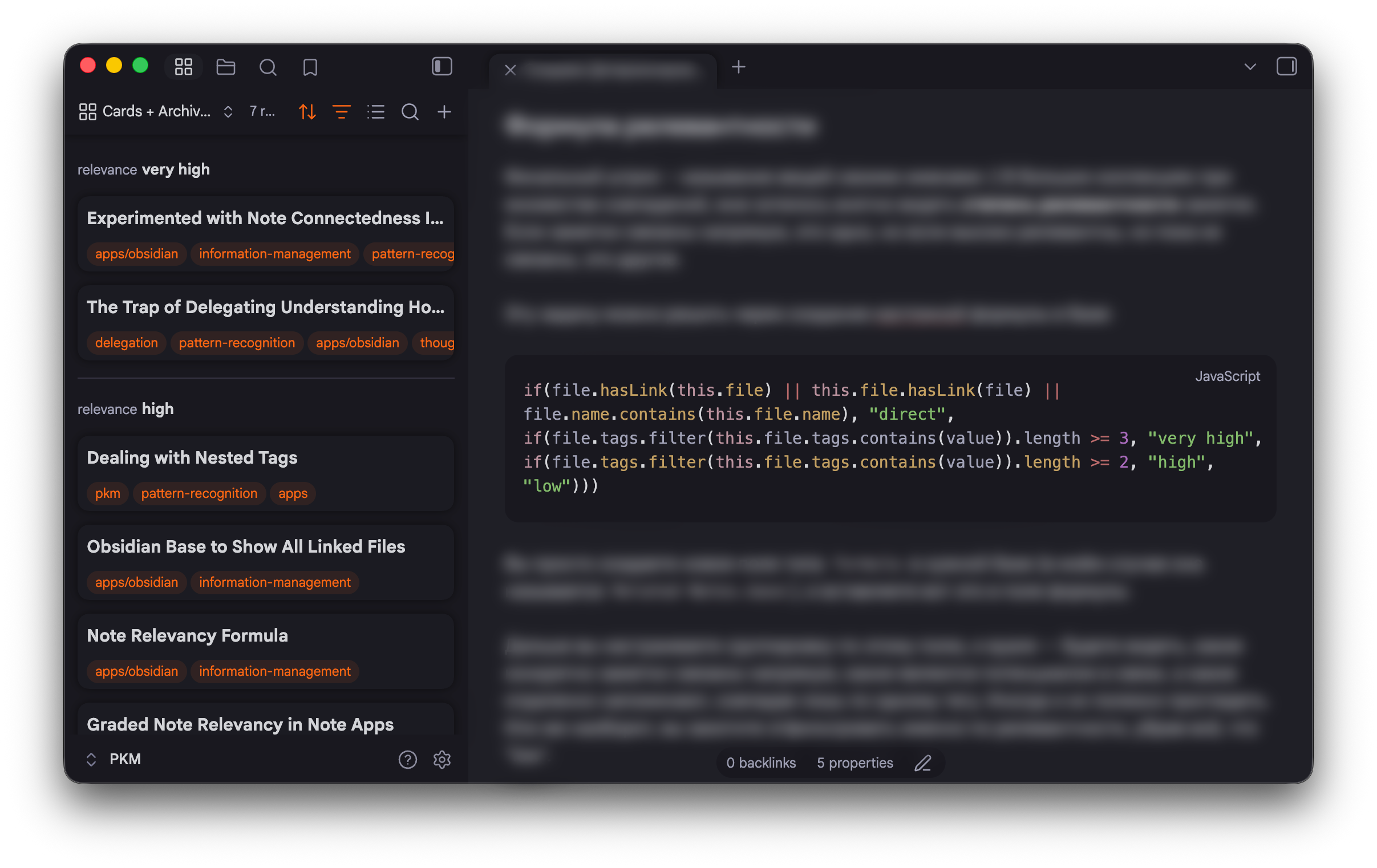
Apparently we can get there — by creating a Base formula that simply counts how much of an overlap notes have through matching tags:
if(file.hasLink(this.file) || this.file.hasLink(file) || file.name.contains(this.file.name)
, "4: direct",
if(file.tags.filter(this.file.tags.contains(value)).length >= 3, "3: very high",
if(file.tags.filter(this.file.tags.contains(value)).length >= 2, "2: high",
"1: low")))
Basically the formula above allows to have 1 tag overlap, but the field (let’s call it “Relevance”) will explicitly tell you these notes’ relevance is “low”. 2 tag overlap is “high”, 3 tag is “very high” and direct linking will show notes as “directly connected”.
Then you sort your Bases view by this field (“Relevance”) and see a graded view of notes potential for connections.
For this to work in the Bases in previous section you need to replace
file.tags.filter(this.file.tags.contains(value)).length >= 2with broader…
file.tags.containsAny(this.file.tags)…which will return any tag match, even if it’s just one.
You still have to do the tagging job — but it’s still you, not some AI in your vault. Full control.
The Result
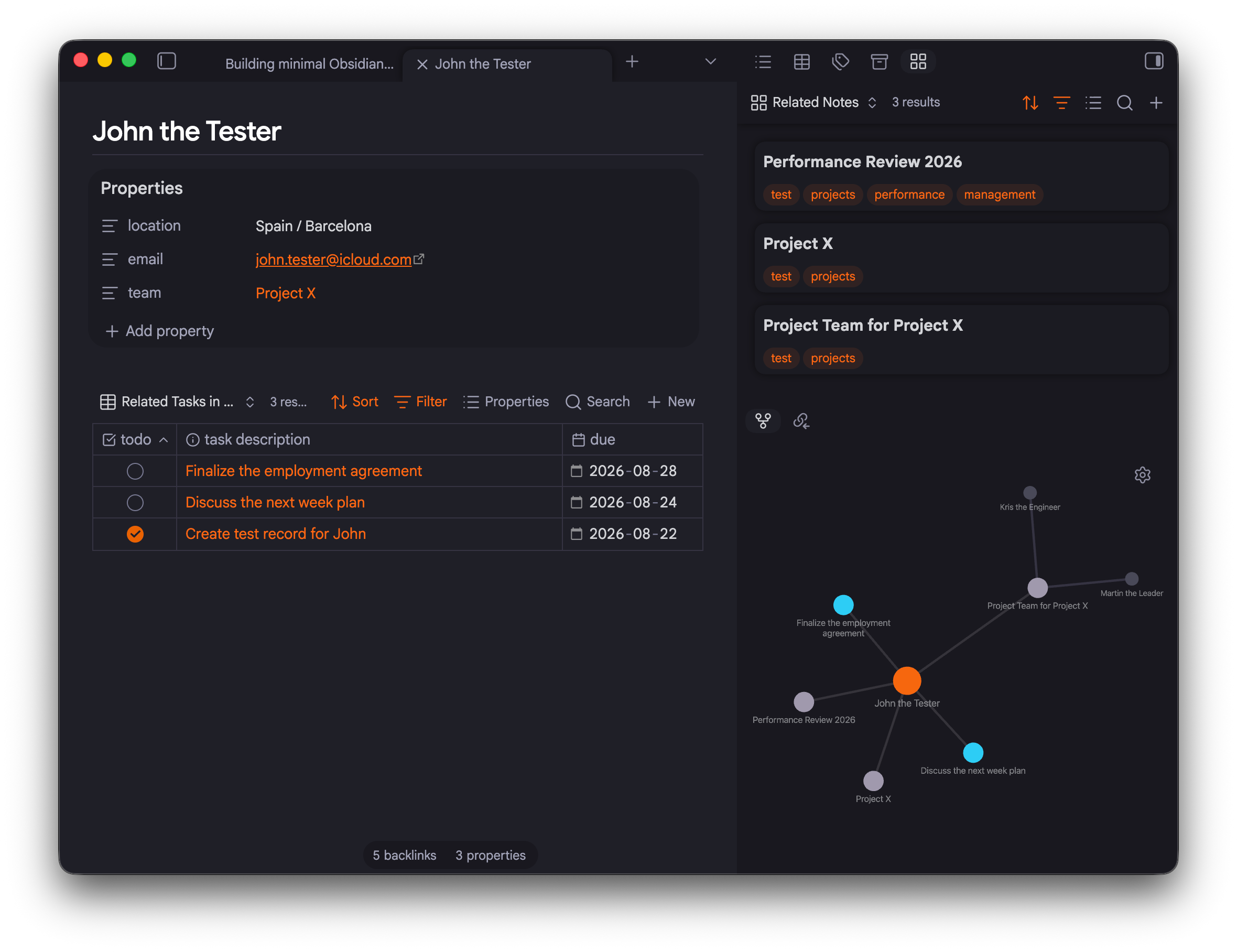
The mechanisms outlined in this article remain very much interesting to explore, yet already prove themselves quite effective. The amount of times the Related notes sidebar surprised me with meaningful notes I forgot I have or didn’t know I have is countless. It just works.
Task management transformed: previously I had scratched my head “which area does it fit”, or “what has to be around next time I see it”. Now I just link to whatever the task is relevant to, all at once: “Migration project”, “Q3 project report”, “discuss with John”.
Now I start typing in the quick switcher even before I open a project note, and see “hey, I’ve actually done this before on another project”. The mechanics for task entry and note entry is the same: first you look at what you have in your vault.
Outside of Obsidian I’ve also drafted a couple of Apple Shortcuts to create tasks and notes directly from Apple Spotlight, Control Center, and an Action Button on the phone.
The simplicity of Obsidian’s “file over app” mindset coupled with the fundamental flexibility in how you can manage the information around you is just not something other tools can match today.
P.S. The Nu Ayu theme from the screenshots is available here.